Use Case
Build competitive battle cards for your sales team
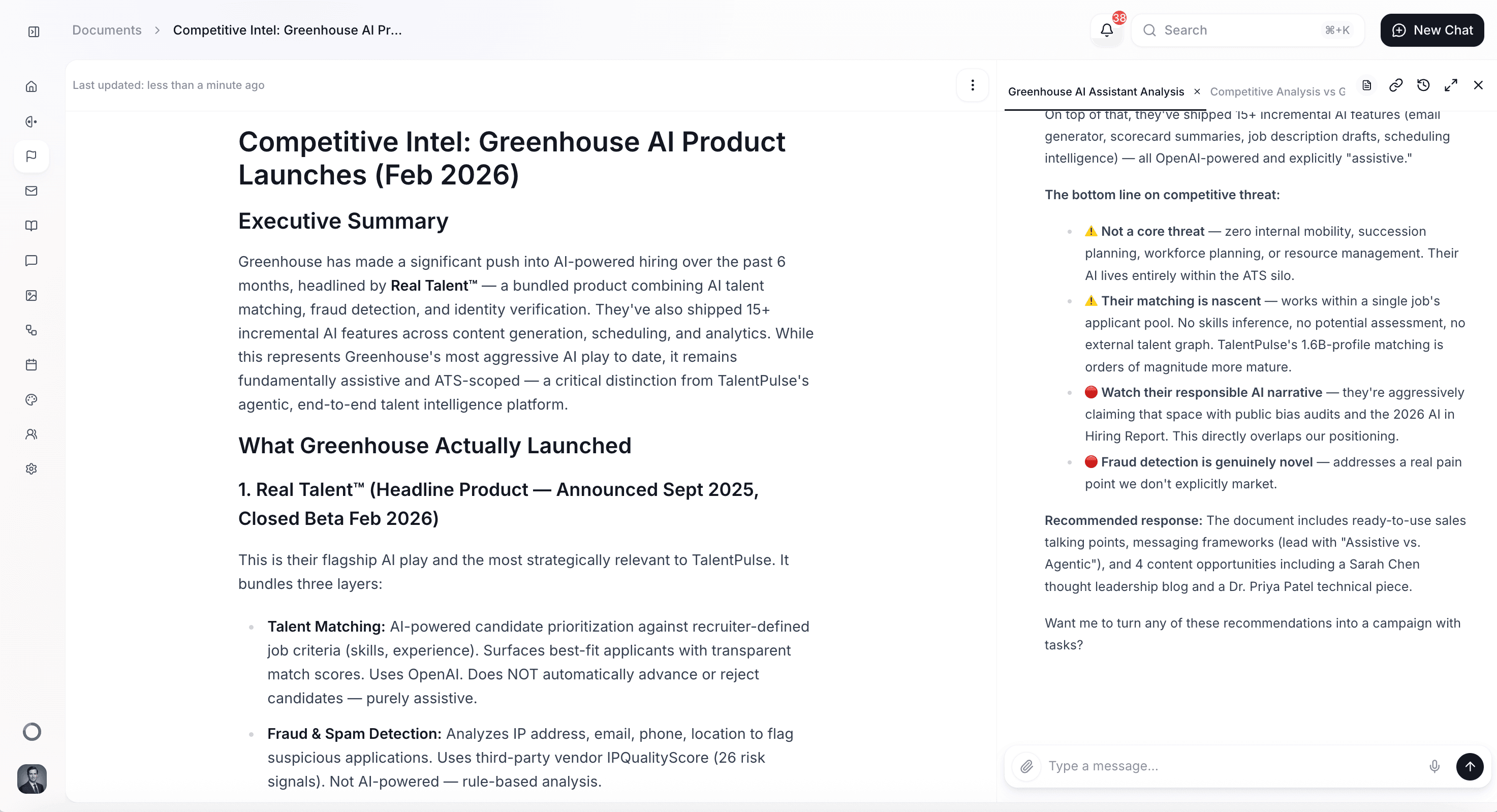
Create detailed, side-by-side competitor comparisons your sales team can reference during calls — with feature breakdowns, pricing intel, objection handling, and win/loss positioning.
How it Works
Before you start
This use case works best when you've already set up some foundational elements in Quotient:
- Memories populated: Add your product overview, pricing details, and key differentiators. The more detail you provide, the sharper the competitive comparisons.
- Competitor information available: Have competitor names, websites, and any known details about their products, pricing, or weaknesses. The agent will supplement with web research.
- Sales team input (optional): If your sales reps have shared common objections or competitive scenarios they encounter, include those for more practical battle cards.
How to do it in Quotient
1. Start a conversation with the Quotient agent
Open a new chat and describe the battle card you need. Specify the competitor and what areas to cover. For example:
"Create a competitive battle card comparing us to HubSpot. Cover features, pricing, AI capabilities, ease of use, and integration ecosystem. Include common objections our sales team hears and recommended responses. Format it so sales reps can scan it in 2 minutes before a call."
2. The agent researches and drafts
The agent researches the competitor's current product, pricing, and positioning, then creates a structured Document with side-by-side comparisons. It references your Memories for accurate product details and frames comparisons to highlight your advantages.
3. Review and sharpen
Read through the battle card and ask for refinements:
- "Add a section on their recent pricing changes — customers are confused about their new model"
- "Include specific trap questions our reps can ask during demos"
- "Make the objection handling more conversational — less scripted"
- "Add a quick-reference table at the top comparing the 5 most important features"
4. Distribute to your team
Share the battle card with your sales team via your internal tools. Keep it as a living Document in Quotient and update it regularly as competitors evolve. You can also ask the agent to save key insights to the Memories so the Quotient agent always has access to the competitive context.
What you'll get
A typical battle card includes:
- Quick-reference comparison table — side-by-side feature/capability comparison for fast scanning
- Pricing analysis — how their pricing model compares to yours, including hidden costs
- Strengths and weaknesses — honest assessment of where they're strong and where you win
- Objection handling — responses to the most common competitive objections
- Trap questions — questions your reps can ask that expose competitor weaknesses
Tips for better results
- Be honest about weaknesses. Battle cards that only highlight your strengths aren't useful. Ask the agent to include areas where the competitor is genuinely strong so reps aren't caught off guard.
- Include real customer quotes. If you have quotes from customers who switched from the competitor, include them. Nothing is more persuasive than a peer's experience.
- Update regularly. Competitors evolve. Set a reminder to refresh battle cards quarterly, or ask the agent to research updates whenever a competitor makes a major announcement.
- Test with your sales team. After distributing, ask reps which sections they use most and which objections they still struggle with. Use that feedback to refine.
- Create one per competitor. A battle card that tries to compare you against 5 competitors at once is too diluted. Create focused, detailed cards for each major competitor.
Get Started
Create a competitive battle card comparing us to HubSpot. Cover features, pricing, AI capabilities, ease of use, and integrations. Include common objections our sales team hears and recommended responses. Format it so reps can scan it in 2 minutes before a call. Add a quick-reference comparison table at the top.