

Three marquee updates this week: monday.com and DataForSEO are now in Quotient's MCP marketplace, Audience Notes keep narrative context with the people and companies it belongs to, and core app pages open noticeably faster across the board. Alongside those, a handful of smaller improvements tighten up chat, audience filters, the flow editor, and dark-mode rendering.
Connect monday.com and DataForSEO from the MCP marketplace
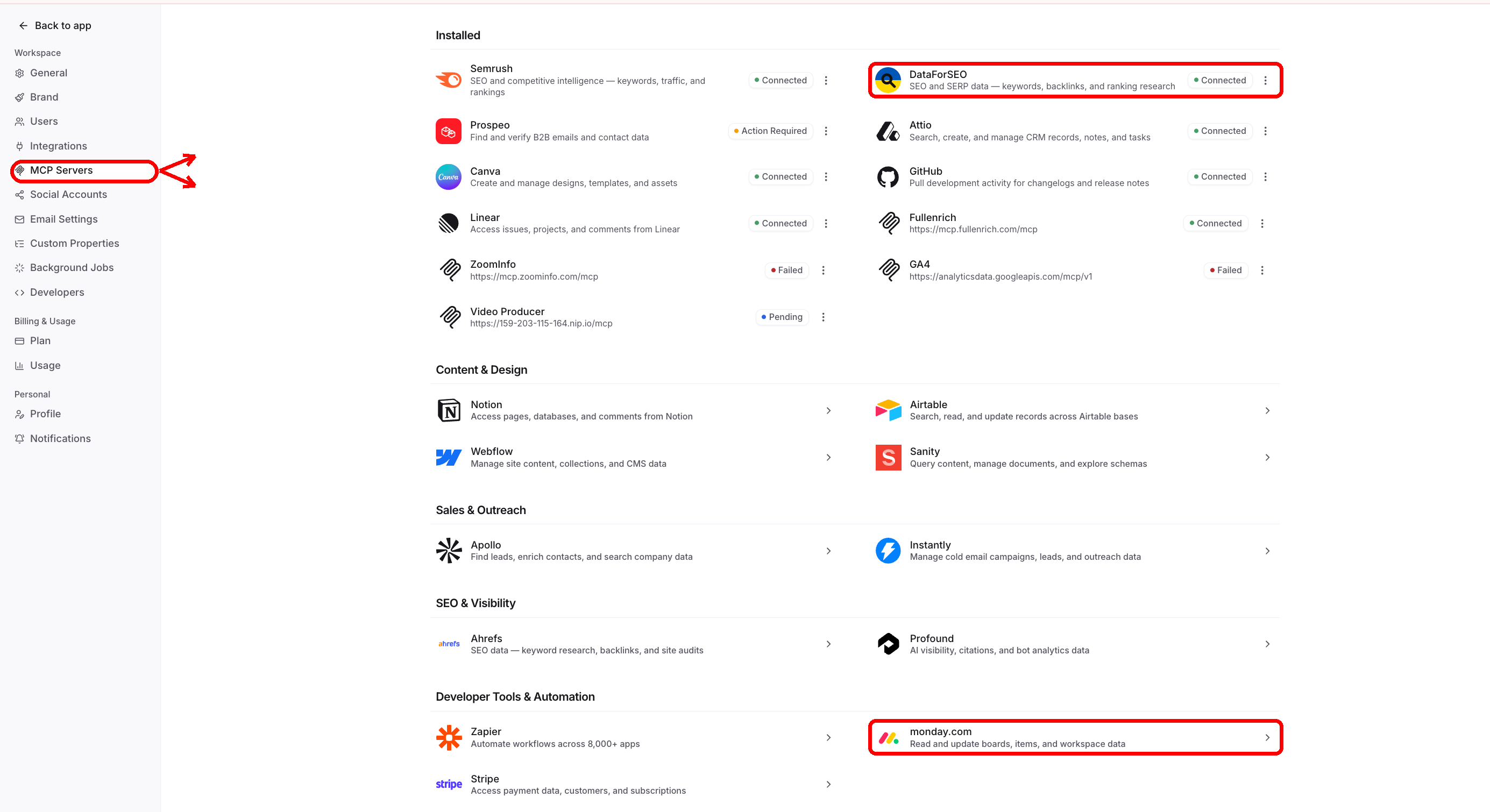
Quotient's MCP marketplace now includes monday.com (under Developer Tools & Automation) and DataForSEO (under SEO & Visibility). Both connect via their provider's OAuth flow, with no custom server URL to find, paste, or maintain. Once connected, Quotient agents can pull in board context from monday.com or run keyword and SERP lookups through DataForSEO directly inside a chat or workflow. Before this update, adding either service required choosing Custom Server and entering the correct endpoint by hand.
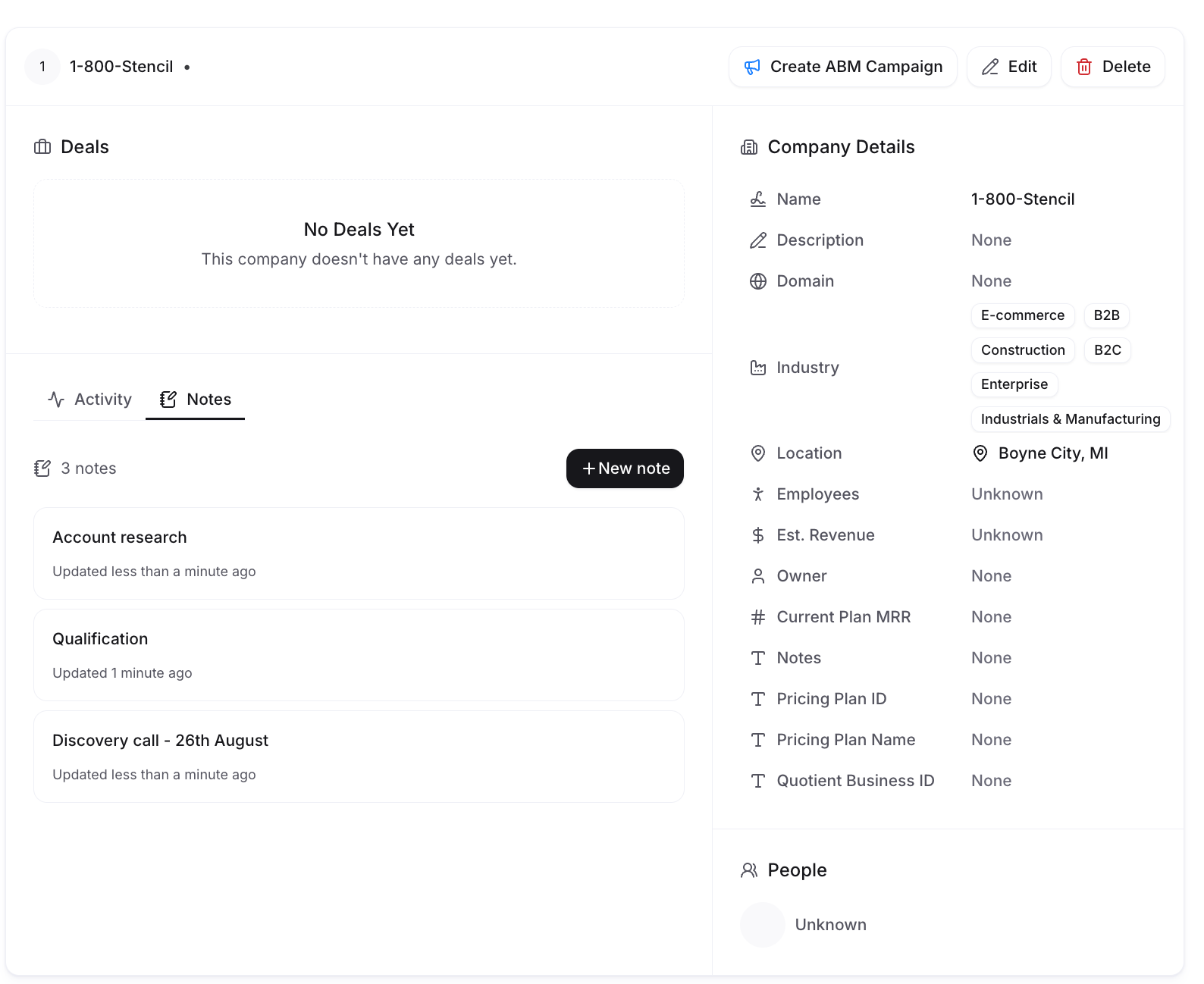
Audience Notes keep durable context with people and companies
Person and company records now include a Notes tab for the narrative context that rarely fits in a structured field. You can create multiple titled notes on each record, edit them together in real time, and rely on autosave so a half-finished account-research note does not vanish when you switch tabs. Notes are shown newest first, with pagination and archiving when you need it.
Notes also work across Quotient's agent workflows. An enrichment flow can write account research to a company record, then a later agent preparing campaign work can read that same context directly, without someone copying it from one tool to another. Searching or indexing note contents is not included in this release, and note archiving is currently handled from the Notes interface by human users.
Core app pages open immediately
Home, Chat History, Campaigns, Calendar, Tasks, Email Broadcasts, Email Templates, Components, Flows, Marketing Events, Lists, Segments, and New Chat now prefetch the page shell and load live data on the client. In practice this means clicking between pages feels continuous, no full-page skeleton to wait through before controls appear, and revisiting a page you were just on can restore cached rows immediately. Authentication and permission checks remain unchanged.
Other improvements
Chat persists across refreshes. Refreshing or recovering a tab no longer clears the active conversation. Sharing a chat is now an explicit "Copy Link to Chat" action, so ordinary page links don't accidentally include a private thread.
Browser-tab titles follow the current page. The tab now shows the campaign, broadcast, document, asset, or settings page you're on, updates live during renames, and stays accurate through Back/Forward navigation. Useful when you keep several Quotient tabs open.
Cleaner audience-filter picker. The search field sits flush at the top, selected rows use checkmarks instead of a separate Selected Items section, and list and segment pickers now search the full matching set rather than only the initially loaded options.
Mouse panning in the flow editor. Right-drag or middle-drag on empty canvas space now pans a flow. Useful when working with a mouse on large automation canvases.
Social Posts and Blog pages open faster. Both pages now render headings and primary actions immediately. Cached rows return on revisits, and filters are encoded in the URL for people who move between these lists frequently.
Campaign cleanup is more complete. Archiving a campaign now archives its associated tasks in the same transaction. If an active deliverable blocks the action, neither the campaign nor its tasks change. The confirmation dialog also shows recognizable deliverable and platform icons with direct links.
Social publishing and LinkedIn reconnects are more dependable. The publishing lifecycle now coordinates root posts, replies, first comments, retries, and notifications more consistently. Reconnecting a saved LinkedIn account updates the existing connection instead of creating a duplicate.
Suppression state and delivery status are more accurate. Suppressed addresses are excluded and can be restored when provider state changes. Individual sends rejected because of suppression now show a terminal Suppressed status, and duplicate soft-bounce webhooks no longer inflate bounce counts.
Email links and inherited text colors render correctly. Internal Quotient paths in sent emails are converted to complete deployed URLs. Nested email components inherit intentional parent text colors, while unstyled templates retain a safe black default.
Queued messages with files complete normally. Queued chat messages carry completed file-extraction context into the next agent turn, so uploaded documents no longer require a page reload to process.
Slack mentions resolve to one Quotient business. An active Slack workspace now has one business destination for mentions. Conflicting connections show a clear error, and failed mention processing receives a fallback reply rather than disappearing silently.
Bug fixes
More accurate deal-based audiences. Deal status, deal count, employee count, and custom-property filters now return the intended contacts. A contact with no company is no longer treated as someone at a zero-deal or zero-employee company, and contacts with multiple deals are no longer duplicated in audience results.
Stronger unsubscribe safeguards. Native inbox unsubscribe requests now reach Quotient directly and propagate to connected systems. Broadcasts and flow triggers exclude unsubscribed people consistently, reducing compliance risk and protecting sender reputation.
Dark mode contrast and responsive broadcast headers. Checkbox states, notifications, uploaded files, and keyboard shortcuts are easier to read in dark mode. Broadcast tabs and action menus no longer compete for the same space when the chat panel is open on a smaller screen.
Blog
Keep up with the latest
from Quotient
Similar Topics